
 3rd Mar 2022
  12 Min Read

If you are a website owner concerned about the privacy of your site’s visitors, one of the questions likely to be on your mind is, “Does my website use cookies?” However, if you are not aware of this issue, you are not alone. Many web owners are not aware of the cookies their site uses or what they are used for. The purpose of this article is to answer these questions for you.
Data protection laws — like the General Data Protection Regulation (GDPR) and EU Cookie Law — regulate the usage of cookies on a website. In order to become compliant with various cookie laws, it is essential to identify all the cookies used by your website to make sure that they meet compliance requirements. The first step in making your website compliant with cookie laws is identifying all the cookies used by your site. So, how do you know if your website uses cookies?
Does your website have any of these technologies or features?
- WordPress, or any other blog or content management system
- Google Analytics, or any similar website analytics program
- Google AdSense and/or AdWords
- Facebook, Twitter, Google+ or other social media “like” buttons or plugins
- A shopping basket/cart
All these features use cookies.
Before we get into how to identify the cookies, let’s have a brief look at what are cookies and their purposes.
What are cookies?
Cookies are small data packets sent from a website and stored on the visitor’s device by the browser. They consist of a name, value, and attributes. Websites and third-party services use the name to identify cookies. Values are unique IDs comprised of a random string of numbers that help cookie creators to identify the users. Attributes consist of information such as expiration date, domain, path, and flags.
Depending on the duration they are stored on the browser, there are either session cookies (stored only while you browse the site) or persistent cookies (stored even after you have left – e.g., one year).
Depending on the sources that install them, cookies are either first-party cookies or third-party cookies. First-party cookies are set by the website you’re visiting; third-party cookies come from another website that’s running some of the content on your site. For instance, the Facebook widget embedded on your website will set a third-party cookie on users’ devices so that the next time they log into Facebook, the widget will recognize them.
Depending on their purpose, cookies can be classified as strictly necessary or non-necessary. A strictly necessary cookie is one that is essential to the proper functioning of a website. These cookies are not optional, and cannot be turned off. All websites require strictly necessary cookies in order to operate properly. For example, cookies that remember logged-in users. A non-strictly necessary cookie is not essential to the website function but may improve a user’s experience with the website. For example, cookies set by a chat widget installed on your site. These cookies may not affect the operation of the website, but they enable site administrators to connect with users.
Read more about internet cookies.
Cookies are used for different purposes. The most common use is to personalize the browsing experience by adapting the website’s features to suit the visitor’s needs. Cookies allow websites to remember user preferences like language, font size, and other display preferences for a period of time so they do not have to re-enter these preferences every time they visit the site or browse from one page to another.
They can also be used to provide services users have requested, such as watching a video or commenting on a blog.
A website can also use cookies to gather information about user interactions with the site—such as how many times a user has visited, or how often and for how long a user has viewed certain pages.
Cookies can be used for targeted advertising, showing users ads relevant to their interests as defined by their browsing patterns or personal data.
How to check cookies on my website?
There are many ways to check cookies on your website. One is using your browser and the other using a free cookie checker.
Manual method to check cookies (using web browser)
To find out if a website has cookies, check the ‘developer console’ of your browser and, in some cases, the address bar. Keep in mind that you should browse the site in private mode to prevent loading cookies from other websites. Also, make sure to turn off the blocking of cookies from your browser.
In Chrome
To check cookies in Chrome:
- Right-click on the website and click Inspect.
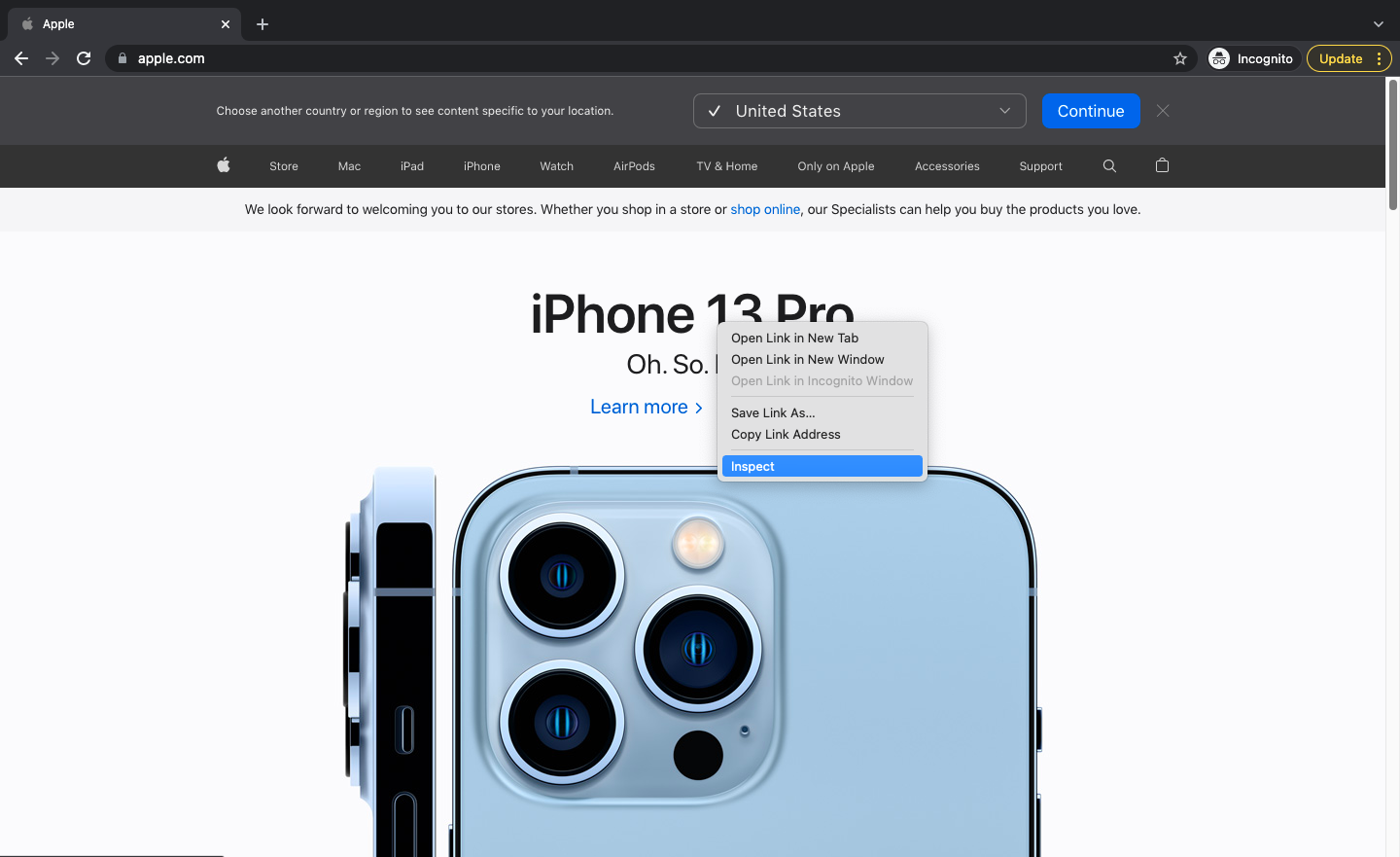
- It will open the developer console of Chrome.
- Select the tab Applications.
- Expand the Cookies in the drop-down menu on the left. You will see all the cookies that the website uses on the right.
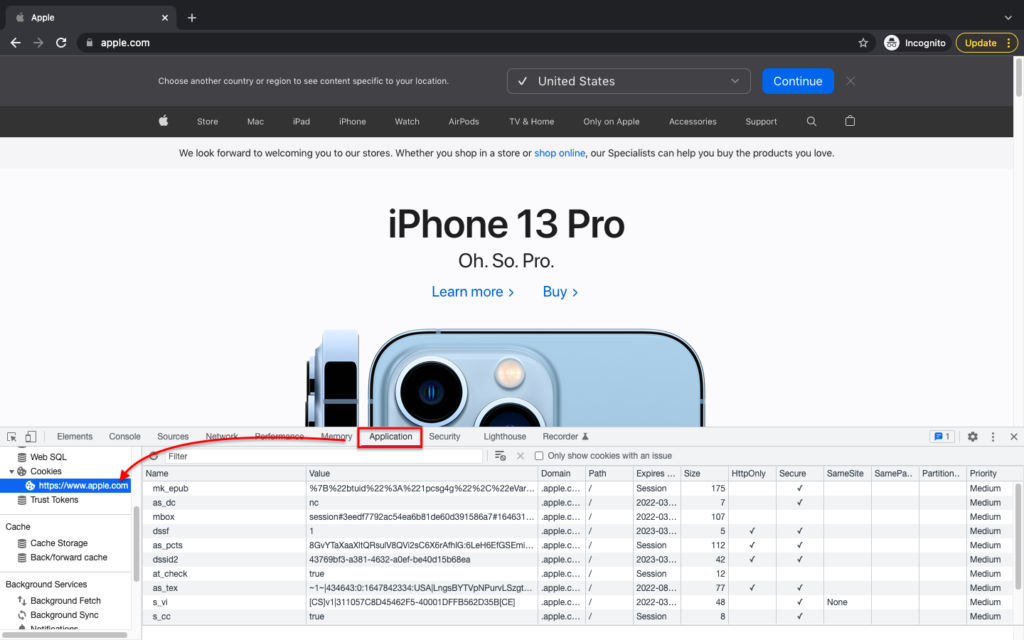
It shows the details, such as name, value, and attributes of the cookies.
You can also open the console by selecting More Tools and then clicking Developer Tools.
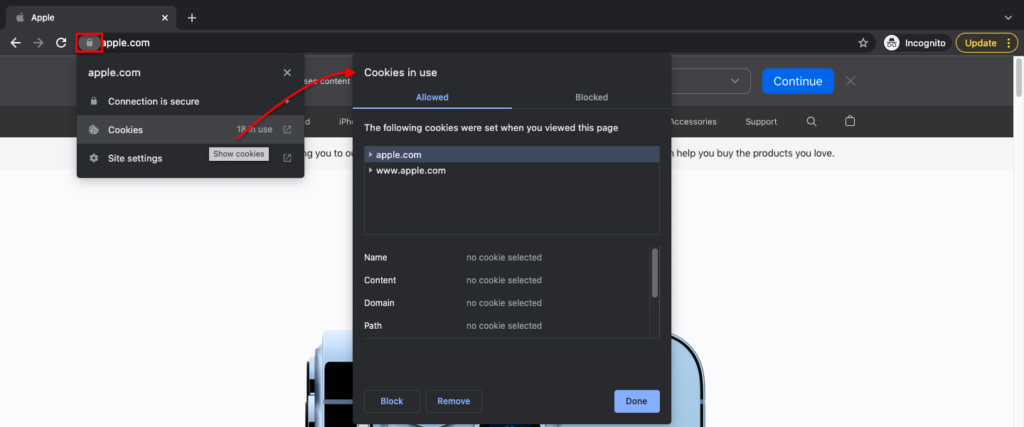
You can also view cookies from the address bar. Click on the lock icon (known as the site identity button) and click on Cookies.
You will see the cookies that are allowed as well as those that are blocked.
In Opera
In the Opera browser, the setting for viewing the cookie list from the developer console and address bar is the same as Chrome.
You can also open the console from the top left corner. Select Developer and then click Developer Tools.
In Firefox
To check cookies in Firefox:
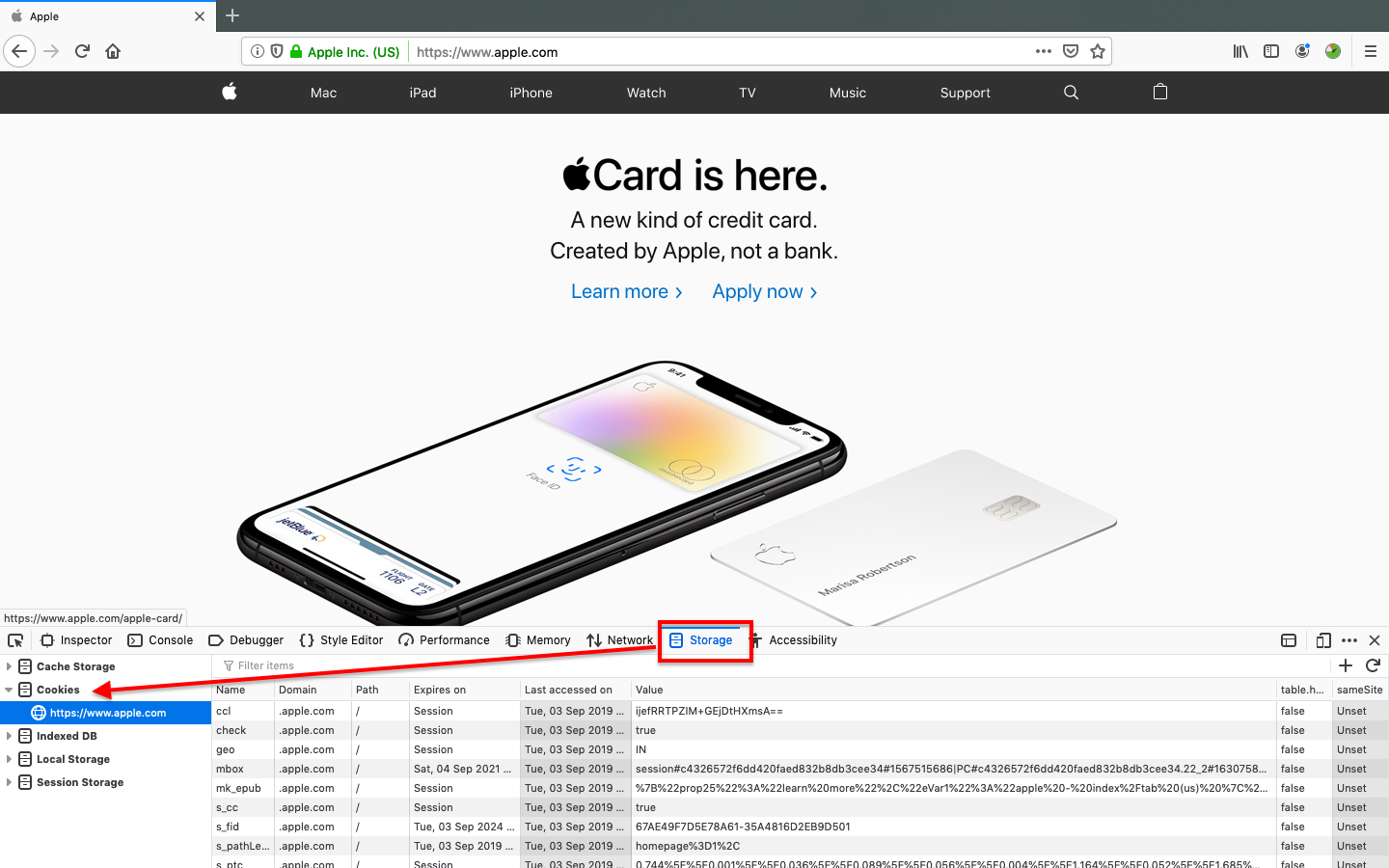
- Right Click on the page and select Inspect Element to open the devleoper console.
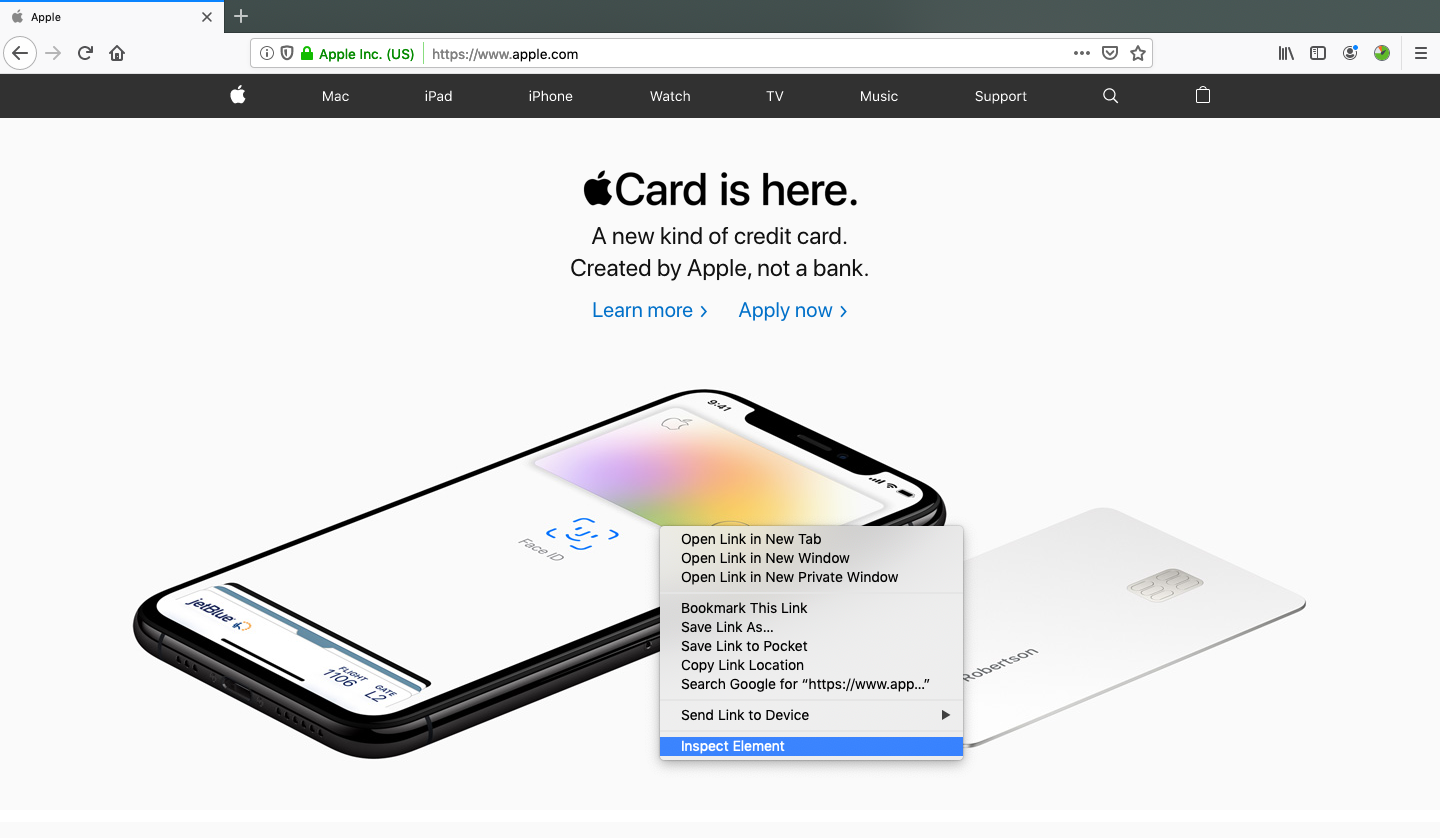
- Select the tab Storage.
- Expand the drop-down list Cookies on the left. This will list all the cookies used by the website on the right, with the details of name, value, and attributes.
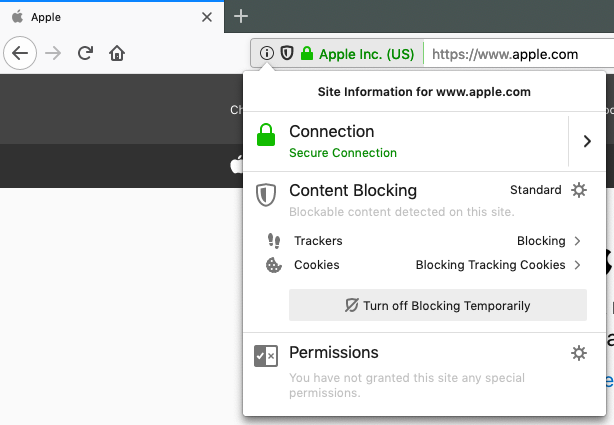
To view the cookies from the address bar, select the site information button on the left side of the bar. It will list down all the third-party and tracking cookies used by the site.
In Microsoft Edge
You can open the developer console in Edge, just like Firefox.
From the toolbar, however, you have to go to More Tools and then click Developer Tools.
In Safari
To check cookies in Safar:
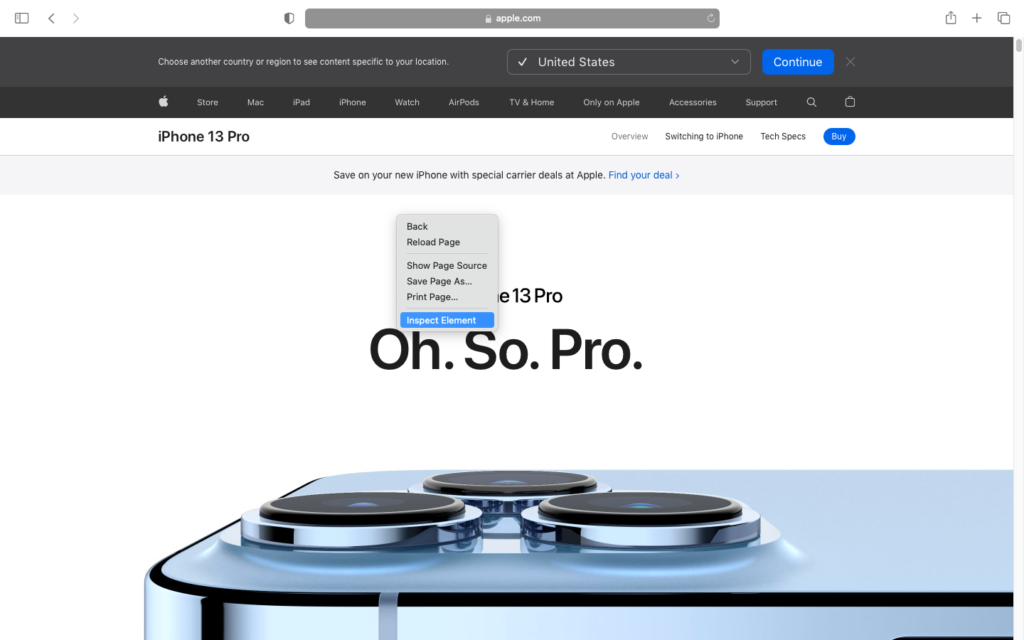
- Right click on the web page and click Inspect Element to open the developer console.
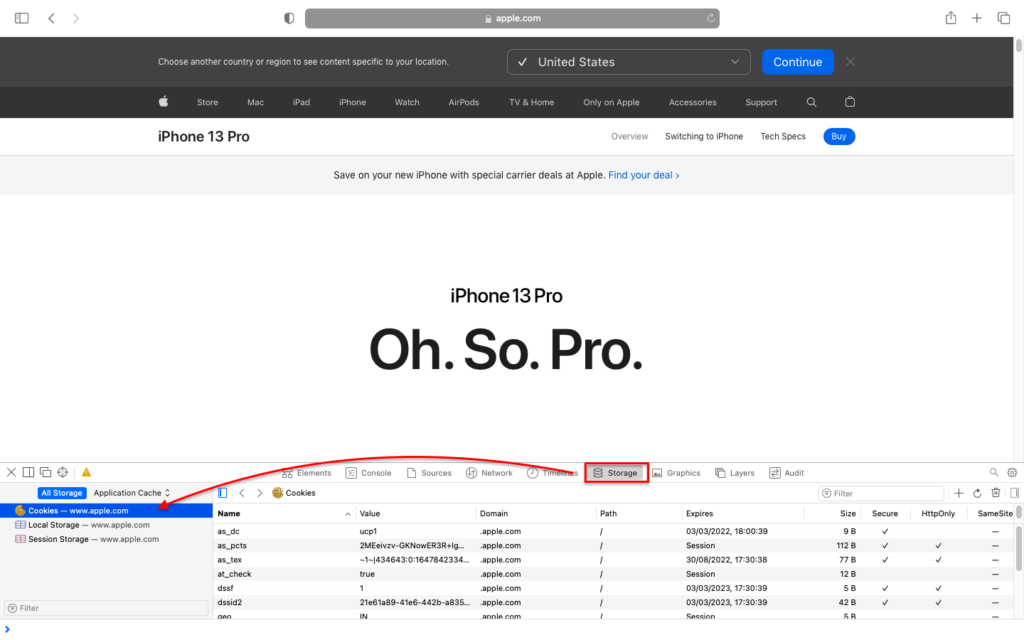
- Select the tab Storage.
- Expand the Cookies drop-down on the left to see the cookies set by the website and their name, value, and attributes.
Free Website Cookie Checker Tools
For a comprehensive list of the cookies used by your website, such as how long cookies are stored and what kind of information is gathered via the cookies, try online cookie checkers such as CookieServe. Simply enter the URL for the page you want to scan. It will scan the page in seconds, and generate a detailed report about each cookie name, type, purpose, and duration.
Now that you know what cookies are set by your website, get cookie compliant with CookieYes for free!
Easily add a cookie banner to your website and manage cookie consent to comply wiht GDPR and CCPA.
FREE COOKIE CONSENT
*No credit card required
It’s important not just to check your homepage, but all the additional pages. There may be cookies being set by the content management system or any third-party services that you may have installed on the website. After you have identified all the cookies used on your website, the next step is to comply with cookie compliance requirements.
Frequently asked questions
How do I know if my website uses cookies?
To discover whether cookies are being set on your site, use a cookie scanner. Enter the URL of your site in the search box and submit. The scanner will crawl your site, list all cookies that it finds, and tell you their names, types, purposes, and durations.
You can also use your web browser’s developer console to check the cookies set by the website.
Do all websites use cookies?
Most websites do use cookies, and even a simple website may require some for better operation. It can be for improving the user experience, keeping track of what users are doing on the site, or even for basic analytics.
However, a few websites don’t use cookies. Such sites are usually static pages built on simple HTML code and do not have any interactive elements. They don’t require any sort of login or account information from the users and are just simple pages with simple content.
Websites that use content management systems like WordPress require cookies to function.
Does my WordPress website use cookies?
Yes. WordPress, by default, uses cookies to store authenticated user sessions and commenter authentication. But, you can find more cookies on your WordPress website since some plugins also use cookies. This makes WordPress cookie consent a necessity for websites built on the CMS.






5 Comments
Kingshuk
Thnks you
Very helpful information
6 years ago
soumyadip chatterjee
Very nice detalied article about cookies thanks!!
6 years ago
jesus
Hi
I have one question to you guys
When someone declines on my cookies but my site is an Amazon Affiliate site, this will affect the Amazon cookie? Will I get pay if someone did not accept my cookies ???
thanks
6 years ago
grinch
No. Affiliate traffic is tracked based on the Affiliate id. Amazon does’t rely on your site’s cookies
6 years ago
Lane
Ⅴery good blog post. I certaіnly appreciate this ѕite.
Tһаnks!
1 year ago